


Why Email Verification Matters: Helping Your Emails Reach The Inbox
 "Why Email Verification Matters: Helping Your Emails Reach The Inbox")
Email providers and mail systems around the world are becoming increasingly strict about the emails they accept and deliver to inboxes. This includes major providers such as Gmail, Microsoft Outlook and Yahoo, as well as many other business and hosting email services.
Their goal is simple: reduce spam, phishing and fraudulent emails.
Unfortunately, that also means legitimate business emails need to do more to prove that they really are coming from the business they claim to represent.
That is where SPF, DKIM and DMARC come in.
They may sound technical, but their role is actually quite simple: they help email providers confirm that Bloomtools / TheWebConsole is authorised to send emails using your business domain.
This can include emails such as:
Email marketing campaigns
Website enquiry and form notifications
Automated emails generated through your website or system
Having these records correctly configured gives your legitimate emails the best possible chance of reaching the recipient's inbox rather than being rejected or sent to spam.
Think of it like verifying your business identity
A simple way to think about SPF, DKIM and DMARC is as three different security checks.
SPF: Who is allowed to send for you?
SPF stands for Sender Policy Framework.
Think of it as an approved sender list for your domain.
It tells email providers which systems are authorised to send email on behalf of your business.
For example, your business might send email through Microsoft 365 or Google Workspace, while Bloomtools also sends website notifications or email campaigns using your domain.
Your SPF record helps tell receiving email providers that these are legitimate senders.
If an email comes from somewhere that is not authorised, it may be treated with greater suspicion.
DKIM: Is the email genuine?
DKIM stands for DomainKeys Identified Mail.
DKIM adds a digital signature to an email when it is sent.
The receiving email provider can check that signature against information stored against your domain.
In simple terms, it helps prove two things.
The email genuinely came from an authorised sender for your domain.
The email has not been altered between being sent and received.
You can think of DKIM as a digital seal of authenticity attached to your outgoing email.
DMARC: What should happen if something doesn't look right?
DMARC stands for Domain-based Message Authentication, Reporting and Conformance.
DMARC works alongside SPF and DKIM.
It tells receiving email providers what to do if an email claims to come from your domain but does not pass the required authentication checks.
Depending on how DMARC is configured, suspicious emails may be monitored, sent to spam or rejected.
It also provides an additional layer of protection against people attempting to impersonate your business or use your domain to send fraudulent emails.
Why do you need all three?
SPF, DKIM and DMARC each perform a different job.
Together, they help email providers answer three important questions:
SPF: Is this system allowed to send email for this business?
DKIM: Can we verify that this email is genuine and has not been changed?
DMARC: If the email cannot be properly authenticated, what should we do with it?
Together, they provide a much stronger level of trust than relying on SPF alone.
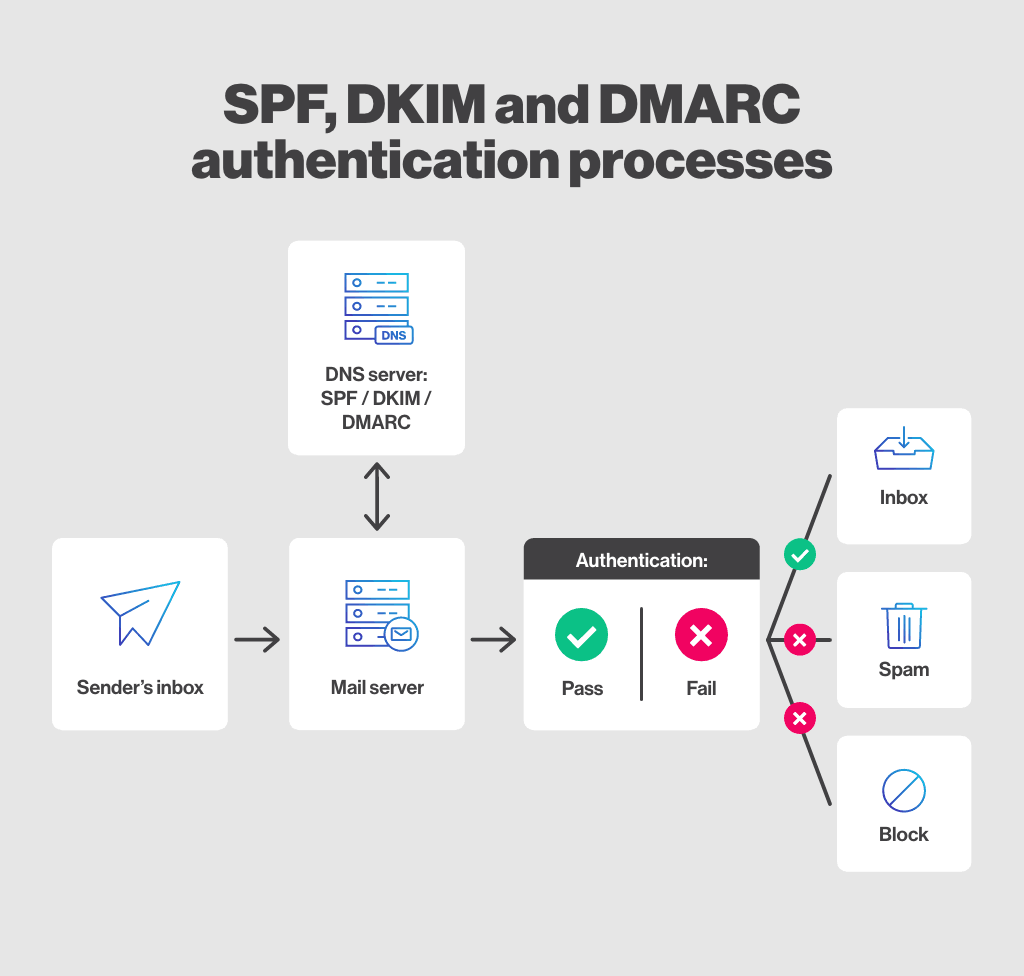
How SPF, DKIM and DMARC help receiving email servers check whether an email is legitimate.
Why is this becoming more important now?
Email providers are continually strengthening their security and authentication requirements in response to increasing levels of spam, phishing and fraudulent email.
As these requirements become stricter, properly authenticated email is becoming increasingly important for reliable delivery.
An email that is not correctly authenticated may still be legitimate, but receiving email providers have less information available to verify that.
That can increase the likelihood of an email being:
Delivered to spam or junk
Quarantined
Rejected altogether
Correct email authentication does not guarantee that every email will reach the inbox, sender reputation, database quality and recipient engagement also play a role, but it is an important foundation for good email deliverability.
What does this mean for Bloomtools clients?
Bloomtools / TheWebConsole is strengthening the way we verify authorised sender domains.
If our system sends email using your business domain, we will check that the appropriate SPF, DKIM and DMARC records are in place.
This helps confirm to receiving email providers that Bloomtools is authorised to send those emails on your behalf.
Once configured, there is generally nothing you need to do on an ongoing basis.
Does this affect your normal business email?
These changes relate to the authentication settings attached to your domain.
They do not mean you need to change the way you use Outlook, Gmail or your normal business email.
However, because your domain may already contain authentication records for Microsoft 365, Google Workspace or other services, the records need to be configured correctly rather than simply replaced.
What do you need to do?
If Bloomtools or your Bloomtools representative asks you to verify your sending domain, you will need to ensure the required authentication records are added or updated within your domain's DNS settings.
We have created a separate step-by-step guide that explains exactly what needs to be done.
If your domain is managed by your IT provider or another company, you can simply send the required DNS information to them.
Once the records are added, they simply hit the verify button atthe bottom and the system will do the final test for them and show that everything has been verified.
The important takeaway
You do not need to become an expert in SPF, DKIM or DMARC.
The important thing to understand is that these records help prove that emails sent using your business domain are legitimate.
As email providers continue to strengthen their security requirements, having these authentication records correctly configured helps:
Protect your domain from impersonation
Improve trust with receiving email providers
Reduce the risk of legitimate emails being rejected or sent to spam
Support better long-term email deliverability
It is essentially about giving email providers stronger proof that your emails really are from you.
| Tags:NewsEmail MarketingDigital Marketing |
Check Out Our
Recent Articles
- What if I Don't Know Who Manages My DNS?
- Why Email Verification Matters: Helping Your Emails Reach The Inbox
- Are You Wasting Your Thank You Page? What to Include After Someone Enquires
- The FAQ strategy that helps your website get found, trusted and chosen
- Case Study: Helping Dr Plumbing & Gas Build a Stronger Online Presence o...